Tuner & Metronome
- 4.5
- Rating
- 10.00M
- Installs
- Free
- Price

 Analysis by App-foxy
I use tuning and metronome apps in very different situations: a quiet practice room, a noisy rehearsal space, a quick warm-up before playing, and those moments when I have forgotten my physical tuner at home. Tuner & Metronome is designed for exactly that kind of flexible music practice. It is a free Music & Audio app from Soundcorset Tuner, combining instrument tuning, tempo support, an auto page turner, and A.I. tutoring in one mobile workspace.
What interested me most was not simply the number of tools, but how much easier it can be to keep one app open instead of switching between a tuner, a metronome, sheet-music controls, and a practice aid. The app has built a strong audience, with a 4.6 average from around 170 thousand ratings and more than 10 million installs. Those figures do not make it perfect, but they suggest that the basic idea works for a wide range of musicians.
My experience is that it is most useful when I want a practical, immediate setup rather than a specialist studio tool. It can help a beginner understand whether a note is sharp or flat, give an intermediate player a steady pulse, and reduce interruptions during a longer practice session. At the same time, the amount of information on screen and the limitations of phone microphones mean that it is not automatically the best choice for every player or every environment.
You May Also Like

 Blood Strike: 2.5 Anniversary
Blood Strike’s Loadouts Turn Every Drop Into a Tactical Gamble
A close look at Blood Strike’s custom loadouts: how fast access to signature weapons reshapes its battle royale rhythm, rewards preparation, and narrows the gap between fights.

 Pandora - Music & Podcasts
Pandora’s Music Is Easy to Start, but Harder to Recover
Pandora’s strength is its low-effort path from a seed to a station. Its weak spot is how much confidence it asks you to place in connection, setup, and quiet recovery.

 8 Ball Pool
 Is Built on Rivalries, Rematches, and Routine
A close look at the rivalries, rematches, shared routines, and unanswered safety questions that turn a quick pool match into a persistent mobile community.

 Samsung Music
’s Quiet Strength Is Playing What You Already Own
Its reach comes less from spectacle than from dependable access to a personal library. That simplicity is both the app’s strongest retention engine and its ceiling.

 AccuWeather: Weather Radar
AccuWeather Review: A Quick, Clear Forecast for Everyday Decisions
For everyday plans, the best forecast is the one you can understand quickly. AccuWeather makes rain timing, radar, and local conditions easy to act on, with a few trade-offs.

 Hill Climb Racing
Why Hill Climb Racing Still Turns Crashes Into One More Run
A tiny car, a bumpy hill and one more upgrade: Hill Climb Racing keeps resurfacing because its simple chaos makes every near-miss feel personal.
More From Our News Desk



How clearly the app presents its tools
I find that an app’s first impression matters most when it gets me into a useful task quickly, and this section looks at how its tuner, metronome, page turning, and tutoring fit into that initial routine. I’ll also consider how a newcomer can avoid feeling pulled in several directions at once. That leads naturally to a closer look at whether the design works for people with different needs and practice environments.
A familiar starting point for everyday practice
The main strength of this app is its direct purpose. I can open it expecting to tune an instrument or set a tempo, without first learning a complicated production workflow. That matters for beginners, children, older musicians, and anyone who becomes frustrated when an app hides its main function behind several menus.
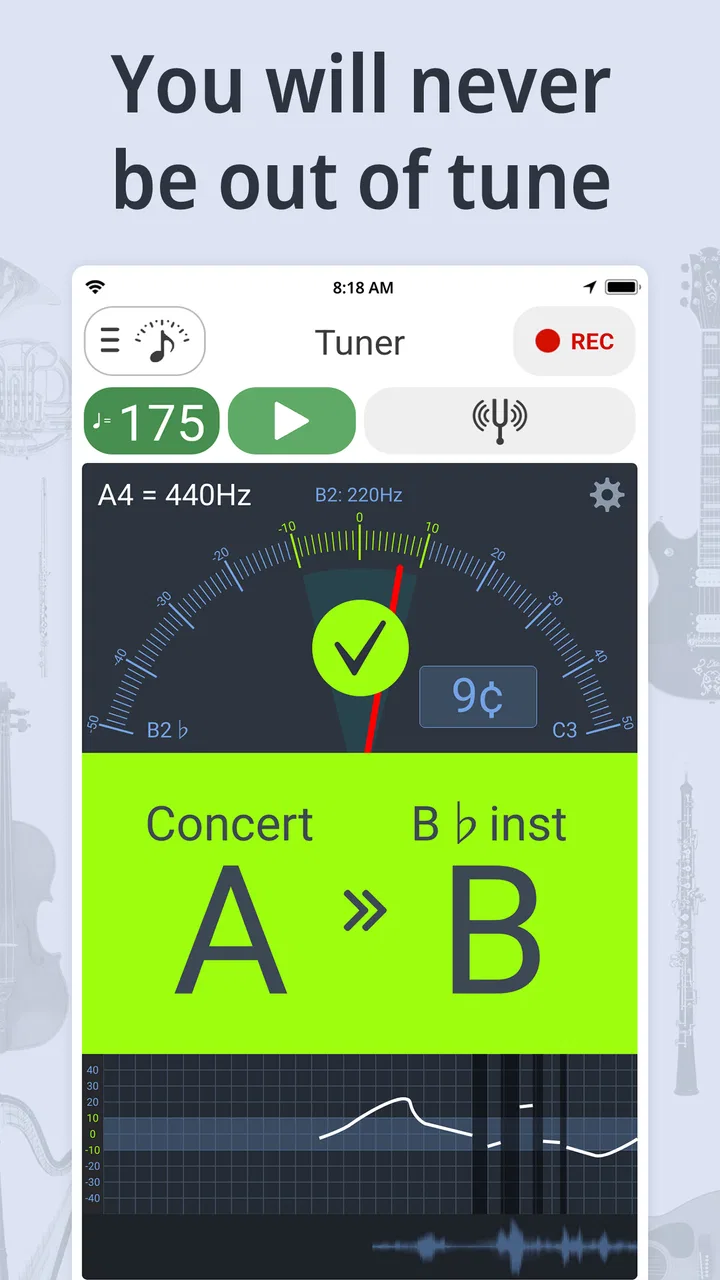
The tuner is the natural first stop. In normal use, I watch the note recognition and adjust the instrument until the display indicates that the pitch is close to the target. For a student who is still learning what “sharp” and “flat” mean, the visual feedback is more useful than relying only on an ear-training habit that has not developed yet. I would still encourage listening carefully, because the screen should support musical judgment rather than replace it.
The metronome is equally important for readability. A tempo tool is only helpful when I can identify the beat quickly and change it without losing my place. Tuner & Metronome keeps these core tasks close enough to make short practice sessions feel less interrupted. That is especially valuable when I am working on scales, repeated passages, or a difficult rhythm and do not want to stop playing to search through a separate app.
Useful concentration, but not a completely quiet interface
Combining several music tools creates a trade-off. I appreciate having tuning, tempo, page turning, and tutoring in the same app, but a multi-purpose screen can feel busier than a dedicated physical tuner or a simple metronome. A new player may need a few sessions to understand which control belongs to the current task and which controls can be ignored.
My advice is to begin with only one workflow. Open the tuner, place the phone where the display is easy to see, and finish tuning before exploring the metronome or tutoring functions. This reduces visual clutter and helps a beginner build confidence. Once the basic controls feel familiar, the extra tools become more helpful instead of becoming distractions.
The best accessibility benefit here is practical clarity: several common music tasks are gathered in one place, but the player still needs to choose a simple routine rather than use every feature at once.
Reading during instrument practice
The auto page turner changes the way I think about the app. It is not just another control beside the tuner; it can reduce the need to touch the phone while playing. For someone who has difficulty making precise finger movements, reaching for a screen between phrases can be awkward. A hands-free page-turning workflow may make practice more continuous, provided the player has prepared the music and the phone is positioned correctly.
There is an important distinction, though. A page turner is only useful if the music itself is readable on the chosen device and if the automatic movement happens at a suitable moment. I would not depend on it for a performance without testing the piece first. During practice, an unexpected page change is a minor interruption. During a recording or recital, it can be much more disruptive.
Support for different learning styles
The A.I. tutoring element gives the app a broader role than a basic chromatic tuner. Some learners prefer immediate guidance instead of working from a printed method book alone. Others need repetition and simple prompts before a musical concept makes sense. I see the tutoring feature as potentially useful for guided practice, especially when a teacher is not present for every session.
Still, I would not treat it as a substitute for a human teacher. A teacher can notice posture, tension, breathing, tone production, and the emotional side of learning. An app can make practice more available and structured, but it cannot fully understand why a player is struggling. The strongest use is as an extra layer of support between lessons, not as the only source of instruction.
How it handles different abilities and real-world situations
A tool can look straightforward and still be awkward when a musician is managing an instrument, reading music, or practicing in a shared room. Here I focus on practical setup choices—such as positioning the phone before playing and testing automatic page turns on an easy passage—that can make the experience more comfortable. I’ll also weigh where those adjustments help and where a different kind of support may be better.
Motor considerations: fewer interruptions can matter
For players with limited hand mobility, tremor, fatigue, or difficulty performing small taps, reducing the number of physical interactions is meaningful. The combined design can prevent a musician from repeatedly picking up a separate tuner, changing a metronome, and turning pages by hand. The auto page turner is the clearest example: when it works with a prepared practice setup, it can let the player keep both hands focused on the instrument.
There are limits. A phone still has to be placed, started, and adjusted. If a musician cannot comfortably tap small on-screen controls, the initial setup may remain difficult. The app does not remove the need for a stable stand, a suitable viewing angle, and a way to keep the device from moving. Those physical details are outside the software, but they strongly affect whether the software feels accessible.
I would set up the app before beginning a demanding passage. Choose the required tool, place the phone within the easiest viewing range, and avoid changing settings while playing. This workflow is particularly helpful for anyone who finds repeated reaching or rapid control changes tiring. It also benefits children, who may lose concentration when practice is constantly interrupted.
Visual and sensory considerations
A tuner can be easier to understand than a purely audio signal because it provides visual confirmation of pitch. That is helpful for players who do not always trust their hearing or who practice at a low volume. A metronome can likewise provide a steady reference without requiring the player to watch the screen continuously, depending on how the player chooses to use it.
However, visual feedback is not automatically accessible to everyone. A musician with low vision may need the phone closer, a larger display, or a different viewing angle. A musician who is sensitive to movement or changing visual information may prefer to focus on sound rather than follow an animated indicator. The app can support different approaches, but the player may need to experiment with placement and attention rather than assuming one display style suits all users.
Sound can also be a concern in shared spaces. A metronome is useful in a practice room, but its audible pulse may disturb others or become difficult to hear in a busy rehearsal. I often prefer to position the phone close enough that the reference is clear without making it unnecessarily loud. In a group, the app is most effective when everyone agrees on the tempo and the player is not relying on a small phone speaker to compete with a full ensemble.
Situational access away from home
The free price makes this an easy app to try before buying a separate accessory. That is valuable for students, casual musicians, and people who play more than one instrument. A phone is already part of many people’s daily routine, so adding a tuner and metronome to the same device can be more convenient than carrying another object.
There is a practical downside to using one device for everything. If I use the phone for sheet music, tuning, tempo, and tutoring, the screen becomes central to the entire session. Notifications, calls, battery level, glare, and limited space can all interfere with concentration. I recommend enabling a quiet practice setup and checking the device position before starting, especially when using the page turner.
The app also makes sense for short, unplanned practice. Imagine arriving early for a lesson and discovering that a string has drifted out of tune. I can open the tuner, make a quick adjustment, and use the metronome while reviewing the passage. In that situation, the convenience of having both tools together is more important than having the most specialized interface available.
For outdoor practice, the situation changes. Bright light can make a phone display harder to read, while wind and surrounding sound can affect microphone-based pitch detection. I would trust the app more in a reasonably quiet indoor setting than beside traffic or a loud group. A physical tuner may be the safer choice when accurate tuning must remain dependable in difficult acoustic conditions.
Where it compares well with separate alternatives
Compared with carrying a dedicated tuner and a physical metronome, this app wins on portability and flexibility. I can keep the basic tools together and move from tuning to rhythm practice without changing equipment. Compared with a simple single-purpose tuner app, it offers a wider practice workflow through page turning and tutoring.
The trade-off is focus. A dedicated tuner often feels more immediate because it does one job and may be easier to read at a glance. A physical metronome can also be more dependable in a room where a phone screen is inconvenient or where battery life is a concern. Musicians who already own reliable accessories may gain less from switching.
Compared with a full music-learning platform, Tuner & Metronome is more practical than comprehensive. It is useful for the moment when I need pitch, pulse, or practice assistance, but I would not expect it to replace a complete course, a teacher, or advanced notation software. That narrower expectation leads to a better experience.
Remaining barriers and everyday friction
The first barrier is environmental noise. Phone-based tuning depends on hearing the instrument clearly enough to identify the note. In a quiet room, this is straightforward. In a crowded classroom or rehearsal, other instruments can make the display less trustworthy. I would tune one instrument at a time and move away from the loudest part of the room whenever possible.
The second barrier is screen dependence. Even though the app can reduce some physical interaction through automatic page turning, the phone remains a visual object that must be positioned and monitored. Someone who wants a completely hands-off practice system may prefer hardware designed for that purpose.
Another consideration is the free model. The app is free to download, while in-app purchases range from under a dollar to around forty dollars per item. That does not make the basic idea unattractive, but I would review any purchase prompt carefully and decide whether an added function genuinely improves my routine. A beginner can start without committing to extra spending, which is a strong advantage, but the long-term value depends on which tools the individual actually uses.
The Teen content rating is also worth noting for families. It means parents should consider whether the overall app experience fits the young musician using it. For a teenager learning an instrument, the rating may not be a concern, but I would still supervise purchases and help younger users establish a focused practice routine.
Who should use it, and who should skip it
I would recommend it to beginners who need a clear starting point, students who want one portable practice companion, and intermediate players who regularly switch between tuning, tempo work, and digital music. It is also worth trying for musicians who find physical page turning disruptive or who benefit from guided prompts between lessons.
I would be more cautious about recommending it to professional performers who need a dedicated, highly visible tuner under demanding stage conditions. I would also point elsewhere for musicians who already have excellent hardware and want advanced recording, notation, or detailed instrument analysis. The app is broad and convenient, not a replacement for every specialist tool.
Players with visual, hearing, or motor differences should approach it experimentally rather than assuming it will solve every access problem. The combined tools may reduce some barriers, especially repeated reaching and the need to carry multiple devices. Yet the phone’s screen, speaker, microphone, and physical placement remain part of the experience. A short trial in the actual practice environment is more informative than judging accessibility from the feature list alone.
My inclusive verdict
After using Tuner & Metronome as a practice companion, I see its greatest value in reducing friction. It brings tuning and tempo into the same place, then adds page turning and A.I. tutoring for players who want a more connected routine. The app is approachable enough for a first-time learner while still useful when I need a quick tool before rehearsal.
Its inclusive potential is real but practical rather than absolute. It can help people who struggle with repeated handling, who need visual support for pitch, or who want guidance without opening several separate apps. It cannot guarantee comfortable access for every user, and noisy surroundings, screen readability, device placement, and reliance on a phone can still create obstacles.
Soundcorset Tuner has kept the app free, with optional purchases available, and its long presence since December 8, 2012, helps explain why it feels like a mature all-purpose option rather than a narrow experiment. I would start with the tuner and metronome, test the page turner on an easy piece, and only then decide whether the tutoring tools belong in my routine.
My final recommendation is simple: try Tuner & Metronome if you want one accessible, portable place for everyday musical practice and are comfortable using your phone as the center of that setup. It is especially convincing for learners and busy musicians. If you need maximum reliability in loud environments, a large hardware display, or advanced professional controls, a dedicated alternative will probably serve you better.
FAQs for Tuner & Metronome
01What features does Tuner & Metronome offer?
Tuner & Metronome provides a comprehensive suite of tools for musicians, including a precise chromatic tuner, a customizable metronome, and a recording feature. Users can adjust the metronome's tempo and time signature, and the tuner supports a wide range of instruments. The app also offers visual cues and an easy-to-navigate interface, making it suitable for both beginners and professionals.
02Is Tuner & Metronome suitable for beginners?
Yes, Tuner & Metronome is designed to be user-friendly and is suitable for musicians of all levels. Beginners will appreciate the straightforward interface and helpful visual guides, while more advanced users can take advantage of the app’s comprehensive features. The app provides tutorials and tips to help new users get started effectively.
03Does Tuner & Metronome work offline?
Yes, Tuner & Metronome works offline, which makes it highly convenient for practice sessions without internet access. All core features, including tuning and metronome functions, are accessible without needing a connection, allowing musicians to practice anywhere and at any time.
04Are there any in-app purchases or ads?
Tuner & Metronome offers a free version that includes ads and basic features. For users who prefer an ad-free experience and additional advanced features, there is a premium version available as an in-app purchase. The subscription provides enhanced functionalities and removes all advertisements.
05How accurate is the tuning feature in Tuner & Metronome?
The tuning feature in Tuner & Metronome is highly accurate, offering a precision level suitable for professional musicians. It uses advanced algorithms to ensure that the pitch detection is reliable and fast. The app supports a wide frequency range, accommodating various instruments and tuning standards.
Pros
- User-friendly interface for easy navigation.
- Accurate tuning for various instruments.
- Customizable metronome settings.
- Supports multiple tuning modes.
- Offline functionality available.
Cons
- Ads can be intrusive at times.
- Limited features in the free version.
- In-app purchases can be pricey.
- Occasional lag during use.
- Requires frequent updates.

Tuner & Metronome
Gallery